SPECIAL OFFER ✦ BUY 2 GET 1 FREE! ✦ ADD 3 PRODUCTS TO YOUR CART, AND THE DISCOUNT APPLIES AUTOMATICALLY!
SPECIAL OFFER ✦ BUY 2 GET 1 FREE! ✦ ADD 3 PRODUCTS TO YOUR CART, AND THE DISCOUNT APPLIES AUTOMATICALLY!
SPECIAL OFFER ✦ BUY 2 GET 1 FREE! ✦ ADD 3 PRODUCTS TO YOUR CART, AND THE DISCOUNT APPLIES AUTOMATICALLY!
SPECIAL OFFER ✦ BUY 2 GET 1 FREE! ✦ ADD 3 PRODUCTS TO YOUR CART, AND THE DISCOUNT APPLIES AUTOMATICALLY!
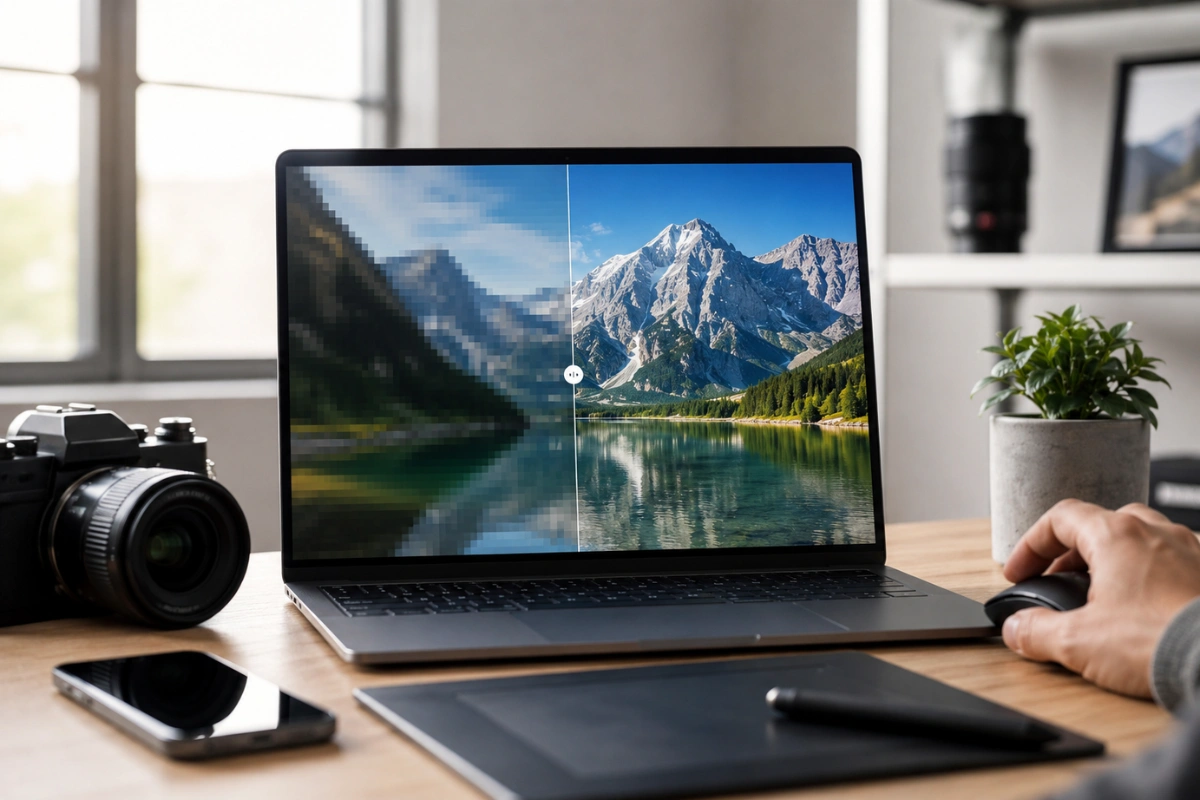
Blurry photos, low-resolution product shots, and pixelated screenshots no longer have to stay that way. Thanks to AI image upscalers, you can now enhance image quality in just a few clicks without spending hours editing in professional software.
In this guide, we’ve rounded up the 8 best AI image upscaler tools in 2026 to help you find the right solution for everything from quick online fixes to professional-quality results.
Each tool offers different strengths, whether you need a free browser-based upscaler, an offline desktop app, or advanced features for portraits, illustrations, or large-format printing.
1. Upscayl
Upscayl offers unlimited, offline AI image upscaling with no watermarks or usage caps.
Upscayl is a free, open-source desktop application available on both Mac and Windows, and it has quickly become a favorite among people who want offline processing without any usage caps. It runs multiple AI models locally on your machine, which means your images never leave your computer, a big plus for anyone concerned about privacy.
What makes Upscayl stand out is its flexibility. You can batch-process dozens of images at once, choose among several upscaling models depending on whether your source is a photo, illustration, or digital art, and export in high resolution without a watermark.
The only downside is that performance depends heavily on your hardware, so older laptops may process images more slowly. Still, for a completely free and unlimited image upscaler HD option, Upscayl is hard to beat.
2. I Love IMG
I Love IMG lets you upscale images online in seconds — no installation or account required.
I Love IMG is a browser-based tool that requires no installation and no account, making it one of the fastest ways to upscale an image online. You simply upload your photo, choose between a 2x or 4x resize, and download the result within moments.
Despite its simple interface, the output quality is genuinely impressive. In side-by-side tests against paid software, I Love IMG consistently rebuilds fine details like fabric texture and facial features with minimal artifacting, which is rare for a completely free web tool.
If you are searching for the best AI image upscaler online that balances simplicity with strong results, this is one of the top picks on this list. It does not offer advanced model selection, but for everyday use it delivers a surprisingly polished finish.
3. Upscale.media
Upscale.media supports up to 8x resizing with built-in noise reduction and before-after previews.
Upscale.media is another web-based option that lets you resize images up to eight times their original size, making it a solid choice if you specifically need an image upscaler 8x. The platform also includes a preview feature so you can compare the before-and-after before committing to a download.
Beyond basic upscaling, it offers additional enhancement settings, such as noise reduction and optional AI enhancements, giving users more control than most free tools. This makes it appealing to people working in portrait or product photography, where small details matter.
That said, some tests show that the output can look slightly softer than that of other tools on this list. It is still a reliable choice, particularly when the extra resize range or added enhancement options are a priority for your project.
4. Gigapixel
Topaz Gigapixel delivers up to 16x upscaling with AI models tailored for photos, portraits, and low-res images.
Gigapixel is a desktop application designed specifically for AI-powered image upscaling. Unlike browser-based tools, it offers greater control over output quality and can enlarge images by up to 16× while preserving fine details, making it a popular choice for photographers, designers, and digital artists.
The software includes AI models optimized for different image types, such as standard photos, portraits, and low-resolution images. It also supports batch processing, allowing you to enhance multiple images in a single workflow, which is especially useful for professional projects.
Although it’s a paid application, many users consider it one of the most reliable AI upscaling tools available. If you regularly create high-resolution visuals for print, marketing materials, or commercial projects, Topaz Gigapixel is a worthwhile investment.
5. VanceAI
VanceAI combines fast processing with specialized models for portraits, low-light photos, and anime artwork.
VanceAI is a well-known name in the upscaling space, offering both online and app-based access with several specialized models for portraits, low-light photos, and anime-style artwork. Its interface is beginner-friendly, with sliders that let you preview quality improvements before processing.
One of its strengths is speed. VanceAI can process high volumes of images quickly, which is useful for e-commerce sellers who need to enhance dozens of product photos at once.
While the free tier has limited credits, the quality on offer is consistently among the best in this list, particularly for anyone hunting for the best image upscaler for product photography or catalog work.
6. Let’s Enhance
Let’s Enhance is built for bulk, consistent upscaling across large image libraries — ideal for agencies and marketing teams.
Let’s Enhance focuses heavily on photographers and marketing teams that need bulk, consistent results across large image libraries. Its AI models are tuned to preserve natural texture, avoiding the overly smoothed, “plastic” look that some upscalers produce.
The platform also integrates automation features, such as folder syncing, which is handy for agencies managing recurring content needs. This positions it well among tools competing to be the best AI image upscaler 2026 for professional teams rather than casual users.
Free usage is limited, but the quality-to-effort ratio remains strong, especially for anyone upscaling images destined for print or large digital displays.
7. Bigjpg
Bigjpg specializes in upscaling anime, illustrations, and digital artwork while preserving clean line work.
Bigjpg is built specifically with anime, illustrations, and digital artwork in mind, setting it apart from tools optimized purely for photographs. Its models are trained to preserve clean line work and flat color areas, which general-purpose upscalers often distort.
For illustrators, comic creators, and anime fans wanting to enlarge fan art or scanned artwork, Bigjpg often delivers noticeably sharper, more faithful results than photo-focused alternatives. It also supports transparent PNGs, which are useful for design assets.
It is less suited to real-world photography, so if your work is mixed media, you may want to pair it with a photo-specific tool from earlier on this list.
8. Topaz Photo AI (Premium Benchmark)
Topaz Photo AI sets the premium benchmark, combining upscaling, noise reduction, and sharpening in one workflow.
While the previous seven tools are free or freemium, Topaz Photo AI remains the gold standard many creators compare everything else against. Its paid software combines upscaling, noise reduction, and sharpening into a single, highly refined workflow.
In direct comparisons, Topaz consistently rebuilds fine detail, natural skin texture, and hair strands more convincingly than most free alternatives, which is exactly why it’s used as the benchmark in most upscaler reviews. It’s a worthwhile investment for professional photographers who need dependable, print-quality results every time.
For casual users, the free tools above may be more than enough, but knowing what a premium ceiling looks like helps set realistic expectations when testing the best free options.
Final Thoughts
Finding the right tool no longer means choosing between quality and convenience, since the 8 best AI image upscalers for 2026 above cover everything from quick browser fixes to professional-grade desktop software. Whether you need a fast, free solution or a premium benchmark to compare against, there’s a tool on this list suited to your project.
Once your images are upscaled and ready, complete the look of your next design project with Tridimensi’s Unlimited Access plan and get instant, unlimited downloads of premium 3D assets to elevate every visual you create.