SPECIAL OFFER ✦ BUY 2 GET 1 FREE! ✦ ADD 3 PRODUCTS TO YOUR CART, AND THE DISCOUNT APPLIES AUTOMATICALLY!
SPECIAL OFFER ✦ BUY 2 GET 1 FREE! ✦ ADD 3 PRODUCTS TO YOUR CART, AND THE DISCOUNT APPLIES AUTOMATICALLY!
SPECIAL OFFER ✦ BUY 2 GET 1 FREE! ✦ ADD 3 PRODUCTS TO YOUR CART, AND THE DISCOUNT APPLIES AUTOMATICALLY!
SPECIAL OFFER ✦ BUY 2 GET 1 FREE! ✦ ADD 3 PRODUCTS TO YOUR CART, AND THE DISCOUNT APPLIES AUTOMATICALLY!
Have you ever wished your AI assistant could work directly with your files, databases, or favorite tools instead of relying on manual copy and paste? What is MCP in Claude? It is the Model Context Protocol (MCP), an open standard developed by Anthropic that allows Claude to connect with external tools and data sources securely.
Rather than treating Claude as a standalone chatbot, MCP enables it to interact with approved resources and complete tasks using real-time information. This makes Claude more practical for development, business, and creative workflows while keeping users in control of what the AI can access.
Key Takeaways
Secure connections: MCP allows Claude to communicate with approved tools, files, and databases through a standard interface.
Smarter workflows: Claude can retrieve live information and perform tasks without relying on manual data transfers.
Greater flexibility: Developers and teams can connect Claude to different applications using one consistent protocol instead of building separate integrations.
What Is MCP in Claude?
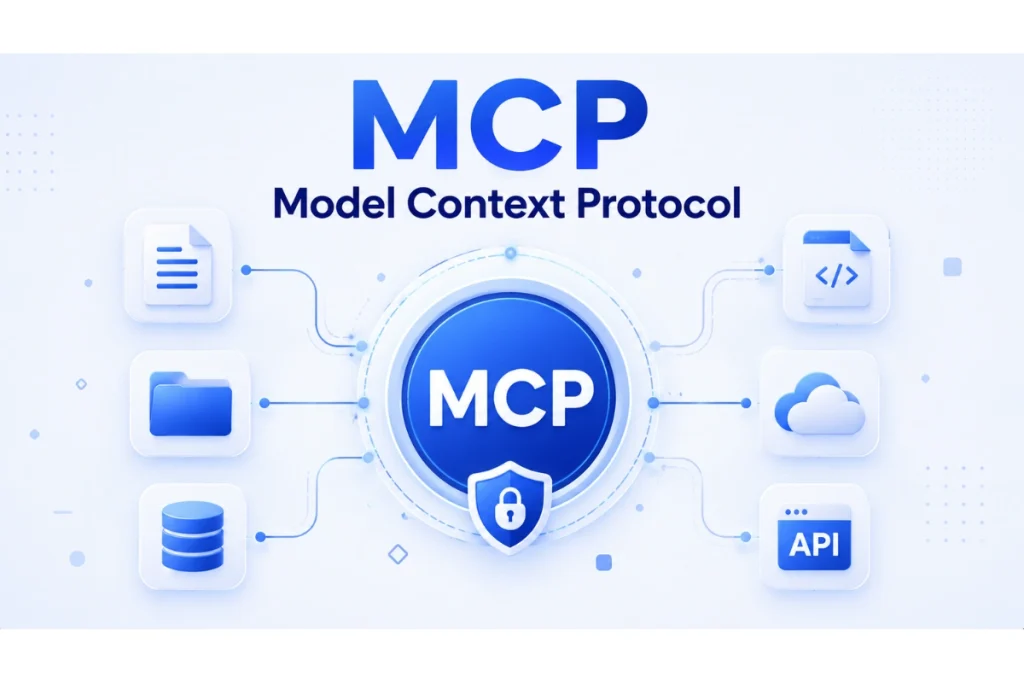
MCP enables Claude to securely connect with approved external tools and data while keeping users in control of access permissions.
MCP, short for Model Context Protocol, is the technology that helps Claude work beyond a traditional chat interface. Developed by Anthropic, it provides a standard way for Claude to communicate with external applications while maintaining user control and security.
Without MCP, Claude can only respond using the information available in the conversation or the tools already built into its environment. If you wanted Claude to analyze a local project, search internal documentation, or interact with another application, you would often need custom integrations or manual steps to provide that information.
MCP changes this experience by creating a consistent connection between Claude and compatible tools. Instead of building a unique integration for every application, developers can use the same protocol to connect different services. This makes Claude easier to extend and simplifies the development process.
Another important advantage is transparency. Claude only works with the tools and resources that you choose to make available. It does not automatically gain access to your files or systems, giving you control over what information is shared during each session.
How Does MCP Work with Claude?
Workflow diagram showing how the Model Context Protocol (MCP) enables Claude to securely retrieve information from approved external tools and return accurate responses.
MCP Follows a Simple Client-Server Model
The MCP client is the application running Claude, such as Claude Desktop. The MCP server provides access to approved resources, including local folders, APIs, databases, or specialized software.
When you ask Claude to perform a task, it first determines whether it needs information from an external tool. If it does, the MCP client sends the request to the appropriate MCP server. The server retrieves the requested information or performs the approved action before returning the result to Claude.
Claude Then Uses This Fresh Context to Generate a Response
For example, instead of uploading a project folder into a chat, you can allow Claude to read selected files directly through an MCP server. Likewise, a developer can let Claude inspect a Git repository, while a designer can connect Claude to an approved asset library.
Because the process follows the same protocol, different tools can work with Claude without requiring separate integrations. This standard approach also makes workflows easier to maintain as new applications and services are added.
What Is MCP Used for in Claude?
MCP helps Claude assist developers, business teams, and creative professionals by securely connecting to the tools and information they use every day.
MCP expands what Claude can do by connecting it with the tools people already use every day.
Developers often use MCP to let Claude inspect local codebases, review repositories, explain unfamiliar functions, or help identify potential issues without manually copying files into a conversation.
Teams can also connect Claude to internal documentation or databases. Instead of searching through multiple systems, users can ask Claude to retrieve relevant information from approved sources, making research faster and reducing repetitive work.
For creative professionals, MCP makes it easier to work with design resources. Claude can help locate approved assets, organize project files, or support content production using information stored in connected systems. This allows designers and marketers to spend less time searching for resources and more time creating high-quality work.
Whether the goal is software development, knowledge management, or creative production, MCP helps Claude become a more capable assistant by connecting it with the information needed to complete real tasks.
Can Claude Free Use MCP?
Claude Free with an MCP-enabled setup, showing how MCP extends AI capabilities by connecting to external tools and data sources.
The availability of MCP depends on how you use Claude. Free users can access Claude’s standard features, but advanced MCP capabilities are generally intended for supported desktop environments, developer workflows, or API-based implementations.
Businesses and developers that want to connect custom tools, local servers, or private resources may require additional setup or supported plans. As MCP continues to evolve, more applications are expected to adopt the protocol, making connected AI workflows even more accessible.
From Smarter AI Workflows to Better Visual Content
Smarter workflows deserve equally impressive visuals. Whether you’re designing a landing page, creating a pitch deck, or launching a marketing campaign, high-quality design assets help your ideas stand out.
With over 5,000 premium 3D assets, Tridimensi makes it easy to create professional visuals that enhance every project while saving valuable production time.
Final Thoughts
MCP is transforming Claude from a conversational AI into a more capable assistant that works with the tools and information you already use. As more applications adopt the protocol, connected workflows will become even more seamless.
Now that you understand what MCP is in Claude, you can combine smarter AI capabilities with premium 3D assets from Tridimensi to create faster, better, and more engaging digital experiences.