SPECIAL OFFER ✦ BUY 2 GET 1 FREE! ✦ ADD 3 PRODUCTS TO YOUR CART, AND THE DISCOUNT APPLIES AUTOMATICALLY!
SPECIAL OFFER ✦ BUY 2 GET 1 FREE! ✦ ADD 3 PRODUCTS TO YOUR CART, AND THE DISCOUNT APPLIES AUTOMATICALLY!
SPECIAL OFFER ✦ BUY 2 GET 1 FREE! ✦ ADD 3 PRODUCTS TO YOUR CART, AND THE DISCOUNT APPLIES AUTOMATICALLY!
SPECIAL OFFER ✦ BUY 2 GET 1 FREE! ✦ ADD 3 PRODUCTS TO YOUR CART, AND THE DISCOUNT APPLIES AUTOMATICALLY!
Faster rendering, smoother animations, and more realistic 3D experiences are no longer optional for modern websites. Choosing the right graphics API has become a critical decision for developers building everything from product configurators to immersive web applications.
In the WebGL vs WebGPU comparison, both technologies offer distinct advantages, but understanding their differences is essential before investing in your next project. This guide covers everything you need to know, from performance and browser compatibility to real-world use cases.
What Is WebGL For?
WebGL has powered browser-based 3D graphics since 2011, from product configurators to animated web experiences.
WebGL has been the backbone of browser-based 3D graphics since 2011, enabling developers to render interactive visuals directly in a web page without plugins. It is built on top of OpenGL ES, which means it inherits both the strengths and the age of that older graphics standard.
For over a decade, it has powered everything from product configurators to browser games and animated landing pages.
So what is WebGL for in practical terms? It handles tasks such as drawing 3D models, applying textures, performing lighting calculations, and animating shapes in real time, all in JavaScript. Designers use it to bring product mockups, 3D icons, and animated backgrounds to life without asking users to install anything extra.
Despite its age, WebGL remains widely supported across almost every browser and device, which is exactly why so many production websites still rely on it. Its maturity means there’s a huge ecosystem of libraries, tutorials, and ready-made assets built specifically for it. That said, its aging architecture is also the main reason developers started looking for something faster and more efficient.
What Is WebGPU?
WebGPU gives developers direct, low-level access to the GPU, built for the demands of modern graphics hardware.
WebGPU is the modern successor designed to give web developers direct, low-level access to a device’s graphics processing unit. Unlike WebGL, which was adapted from an older desktop graphics API, WebGPU was built from the ground up with today’s GPU architectures in mind. It reflects design patterns already used in native APIs like Vulkan, Metal, and DirectX 12.
So what is WebGPU exactly, in simple terms? It is a browser API that lets web applications communicate more efficiently with the GPU, reducing overhead and unlocking features like compute shaders for general-purpose GPU tasks. This means WebGPU can handle far more complex scenes, physics simulations, and machine learning workloads directly inside the browser.
Because it is newer, WebGPU support is still expanding across browsers, though major ones like Chrome and Edge have already adopted it in stable releases.
Developers experimenting with advanced visual effects, real-time simulations, or heavier 3D scenes are increasingly turning to it. It represents where browser graphics are heading, even if adoption is still catching up to WebGL’s long-standing dominance.
WebGL vs WebGPU: Key Technical Differences
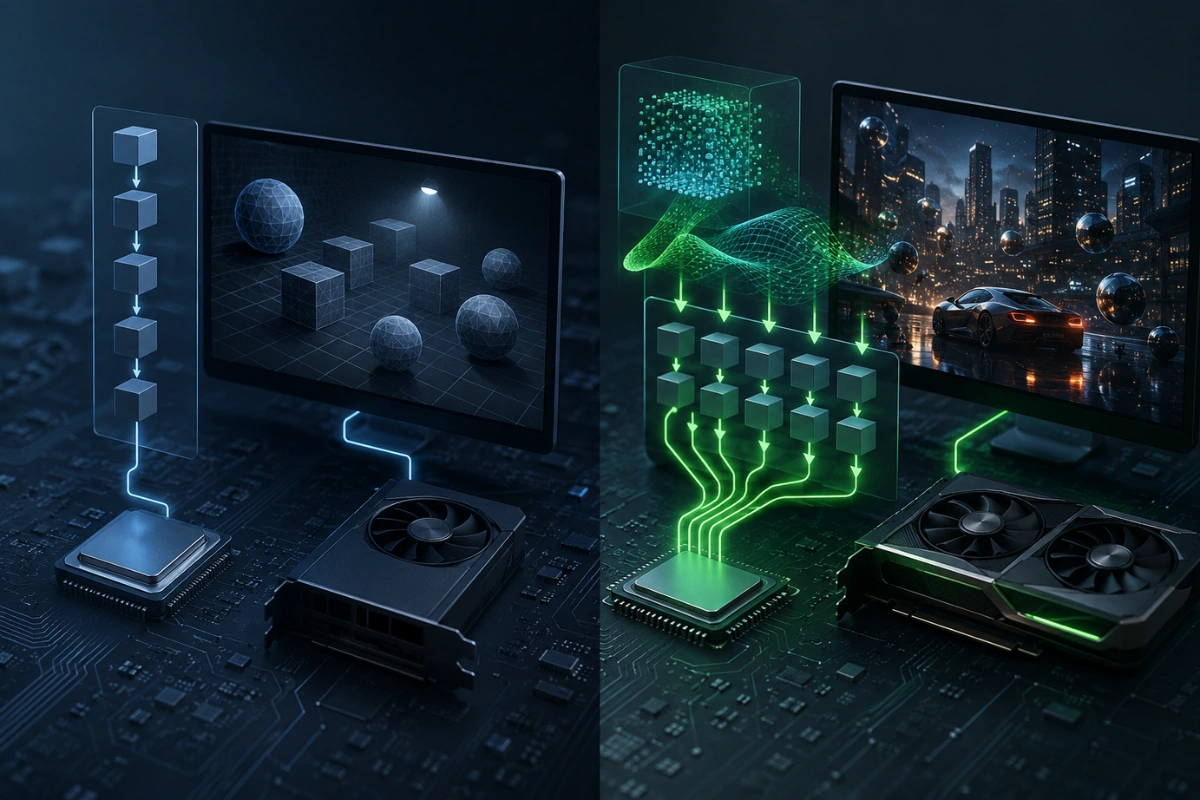
WebGL relies on an older single-threaded model, while WebGPU uses a more efficient command-buffer approach.
At the core of the WebGL vs WebGPU debate is how each API talks to the hardware.
WebGL uses a single-threaded, immediate-mode programming model that made sense a decade ago but now creates bottlenecks on modern multi-core GPUs. WebGPU, in contrast, uses a command-buffer model that allows work to be prepared in advance and submitted more efficiently.
Another major difference lies in compute capability. WebGL was designed purely for rendering graphics, whereas WebGPU introduces compute shaders, enabling the browser to run general-purpose parallel computations such as physics simulations or AI inference. This alone opens up entirely new categories of browser-based applications that were previously impractical.
Memory management and API overhead are also handled very differently. WebGPU minimizes redundant state validation and driver overhead compared to WebGL, giving developers finer control over resources like buffers and pipelines. These structural changes are precisely what make WebGPU noticeably more efficient in demanding scenes.
Why Is WebGPU Faster Than WebGL?
WebGPU reduces CPU bottlenecks and supports compute shaders, resulting in smoother performance for complex 3D scenes.
WebGPU was designed to match how modern GPUs process data, using parallelized command submission rather than the older sequential calls that WebGL depends on. This reduces the CPU-side bottleneck that often slows WebGL scenes down as complexity grows.
WebGPU also allows developers to precompile rendering pipelines, so the browser doesn’t need to revalidate the same instructions every frame.
Combined with support for compute shaders, this lets WebGPU distribute heavy calculations across GPU cores far more effectively than WebGL ever could. The result is smoother frame rates in scenes with many objects, particles, or dynamic lighting.
In practical testing, WebGPU consistently shows lower CPU usage and better frame stability in scenes with thousands of draw calls or complex shader effects.
For simple animations, the difference may be barely noticeable, but for data-heavy visualizations or dense 3D environments, WebGPU’s performance advantage becomes clear. This is why performance-focused studios are gradually shifting new projects toward it.
Does WebGPU Replace WebGL?
WebGPU isn’t replacing WebGL yet — most teams use both, falling back to WebGL for broader compatibility.
Not yet, and possibly not for a long time. WebGL still enjoys near-universal browser support, including many older devices and browsers that haven’t implemented WebGPU at all.
For projects that require maximum compatibility today, WebGL remains the safer choice, especially for simpler visuals such as product previews, icons, or lightweight animated backgrounds.
WebGPU is best suited for projects where performance is critical and the target audience uses modern browsers. Many teams are choosing to support both, using WebGPU where available and falling back to WebGL when necessary.
Rather than a hard replacement, think of WebGPU as the natural evolution running alongside WebGL during a transition period. Over the next few years, as adoption grows, WebGPU will likely become the default, but WebGL isn’t disappearing overnight.
Choosing between them today comes down to your specific audience, performance needs, and browser support requirements.
It’s also worth noting that WebGL isn’t standing still, with ongoing patches and community-driven optimizations keeping it relevant for lighter use cases. Many popular 3D libraries still default to WebGL under the hood, simply adding WebGPU as an optional rendering backend. This layered approach means developers can migrate gradually rather than rewrite entire rendering pipelines overnight.
Conclusion
Choosing between WebGL and WebGPU ultimately depends on your project’s audience, performance needs, and how future-proof you want your tech stack to be. WebGL remains a dependable, widely supported choice, while WebGPU offers a faster, more modern path for performance-heavy 3D experiences.
Understanding both helps you make an informed decision rather than guessing which technology fits your next project.
While you’re refining your rendering strategy, don’t forget that great 3D visuals still need great source assets to shine. Tridimensi offers a premium marketplace with over 5,000 curated 3D assets, including objects, backgrounds, and animations, designed to elevate landing pages, campaigns, and presentations quickly and efficiently.