SPECIAL OFFER ✦ BUY 2 GET 1 FREE! ✦ ADD 3 PRODUCTS TO YOUR CART, AND THE DISCOUNT APPLIES AUTOMATICALLY!
SPECIAL OFFER ✦ BUY 2 GET 1 FREE! ✦ ADD 3 PRODUCTS TO YOUR CART, AND THE DISCOUNT APPLIES AUTOMATICALLY!
SPECIAL OFFER ✦ BUY 2 GET 1 FREE! ✦ ADD 3 PRODUCTS TO YOUR CART, AND THE DISCOUNT APPLIES AUTOMATICALLY!
SPECIAL OFFER ✦ BUY 2 GET 1 FREE! ✦ ADD 3 PRODUCTS TO YOUR CART, AND THE DISCOUNT APPLIES AUTOMATICALLY!
Among the many skills website builders must have, one of them is knowing how to improve Core Web Vitals (CWV). By knowing how to, these experts can make exploring a website a better experience than ever before.
Key Takeaways:
Core Web Vitals measure loading speed, interactivity, and visual stability, which directly affect SEO rankings and user experience.
Optimizing LCP, CLS, and INP requires faster image delivery, reserved layout space, reduced JavaScript, and efficient hosting.
CDNs, caching, image compression, and removing unnecessary scripts help websites achieve stronger real-world CWV performance.
What Are Core Web Vitals?
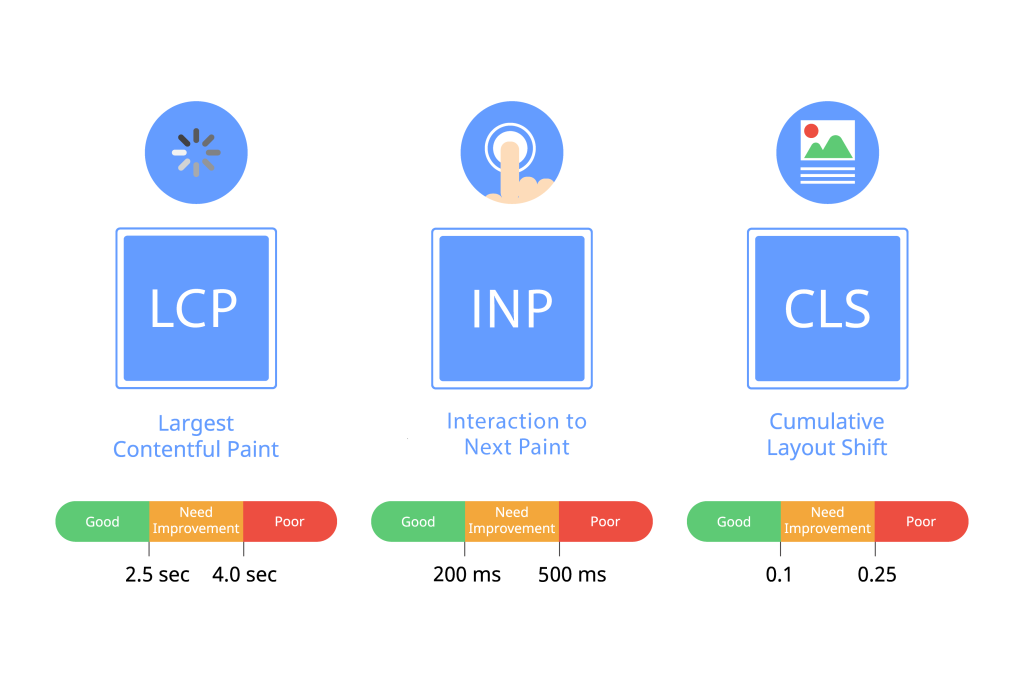
Core Web Vitals metrics (Source: Antegma)
Core Web Vitals (CWV) are metrics by Google that measure real-world user experience for web page loading speed, interactivity, and visual stability.
Google originally incorporated CWVs in 2021, making page performance a direct SEO signal that affects search visibility across every site. This evaluation relies on these core parameters:
Largest Contentful Paint (LCP), which measures loading performance;
Interaction to Next Paint (INP), which assesses interactivity; and
Cumulative Layout Shift (CLS), which tracks visual stability.
As a result, website owners need CWVs to see if their websites have provided the best user experience or not.
To see if the website performs or not, users can run the Core Web Vitals test through Google PageSpeed Insights. This feature pulls both lab and real-world field data from Chrome users, making it important for any serious CWV audit.
Optimize LCP with CDN Delivery and Image Prioritization
Important measurements for LCP (Source: Search Engine Journal)
To start optimizing your website, start with LCP, which reflects how fast users perceive your page as fully loaded. Use images from a CDN in WebP or AVIF format, which cuts file sizes sharply without reducing visual quality.
Then, add the fetchpriority attribute set to “high” on your LCP image, so the browser prioritizes loading that specific asset. Preloading the LCP image and any critical fonts in the document head can also prevent delayed rendering.
You can also remove render-blocking CSS and scripts from the document head to stop them from causing delays in initial render.
Fix CLS by Reserving Space for Dynamic Content
CLS example (Source: Cloudflare)
CLS happens when page elements shift unexpectedly during loading, pushing text and buttons from where users expect to find them. This happens because images and ads are loading without predefined dimensions.
To prevent that, set explicit width and height attributes on every visual so the browser can reserve the correct space. Furthermore, avoid inserting new content above existing page content unless a direct user action on the page triggers it.
Site owners can also load third-party widgets into reserved containers, so they never push surrounding layout elements out of position.
INP (formerly FID) became a CWV metric in 2024 and measures how fast your page responds to every user interaction. The shorter it is, the better the website’s responsibility is to users who are currently opening the website.
You can reduce the INP by auditing your JavaScript and deferring any scripts that don’t contribute to the user experience. Moreover, you should break long-running tasks into smaller chunks so the browser stays free to process user input.
At the same time, it’s important to remove unused JavaScript through tree-shaking and code-splitting. By doing this, you can reduce the total volume of script the browser parses per page load.
Speed Up Server Response with Better Hosting and Caching
All three CWV metrics depend heavily on how quickly your server responds to a visitor. This initial response time is measured by TTFB (Time to First Byte), the exact number of milliseconds it takes for a user’s browser to receive the very first byte of data from your server.
If your TTFB is slow, it creates a bottleneck that drags down all other performance metrics. To prevent this, Google recommends keeping TTFB under 800 milliseconds to ensure strong LCP performance on both mobile and desktop.
To significantly reduce the TTFB, website owners should choose a host with globally distributed infrastructure. Then, they need to activate a CDN to route each visitor’s request to the nearest edge location.
Auditing and removing unnecessary third-party scripts also trims TTFB by cutting the external connections your browser initiates on page loads.
Rethinking Optimization: Important Recent Findings About CWV Performance
Recently, Search Engine Journal analyzed CWV performance across major website platforms and discovered some important findings.
For example, many developers believe that in learning how to improve Core Web Vitals, lighter pages mean better CWV scores. However, the reality may not always be the case.
A proof of this is Shopify, which averaged 3.77 MB per page (the heaviest of any platform in the study), which resulted in a very low Lighthouse lab score. In context, Lighthouse lab scores simulate a worst-case scenario, meaning a heavy platform like Shopify will naturally receive a much lower score in these simulated tests.
Even so, Shopify still ranked third in actual CWV field performance among all the platforms the research compared. Moreover, around 79% of Shopify sites scored “Good” on real-world CWV field data.
So, how did Shopify achieve all these?
To start, Shopify achieves such a performance by optimizing content reaches and renders, apart from compressing files. Its global CDN routes every request to an edge server near each visitor. This dramatically cuts down network latency, especially for LCP (Largest Contentful Paint), the metric that measures how long it takes for the main content on a screen to actually load.
Shopify themes also front-load above-the-fold content so the browser renders what users actually see first before scrolling down. From these examples, any site owner can replicate and adapt them to better match the needs of their websites.
Improve Website Experience with the Best Website Resources
Because user experience is everything, mastering how to improve Core Web Vitals is indispensable for any website builder. The moment something like slow page speed and responsiveness sets in, the user experience is bound to be ruined.