SPECIAL OFFER ✦ BUY 2 GET 1 FREE! ✦ ADD 3 PRODUCTS TO YOUR CART, AND THE DISCOUNT APPLIES AUTOMATICALLY!
SPECIAL OFFER ✦ BUY 2 GET 1 FREE! ✦ ADD 3 PRODUCTS TO YOUR CART, AND THE DISCOUNT APPLIES AUTOMATICALLY!
SPECIAL OFFER ✦ BUY 2 GET 1 FREE! ✦ ADD 3 PRODUCTS TO YOUR CART, AND THE DISCOUNT APPLIES AUTOMATICALLY!
SPECIAL OFFER ✦ BUY 2 GET 1 FREE! ✦ ADD 3 PRODUCTS TO YOUR CART, AND THE DISCOUNT APPLIES AUTOMATICALLY!
Diving into 3D design? Choosing the best 3D modeling software depends on what you’re creating and your experience level. From user-friendly apps to professional suites, the following breakdown of the best tools will help you decide.
Key takeaways:
Compare each of the tools’ performance through features and their workflows.
What is the Best 3D Modeling Software?
The best 3D software is the one that caters to your skill, orientation, and goals. It can be for animation, engineering, or architecture. Below is a curated list of top tools, each with unique strengths to match beginners, hobbyists, and professionals across various creative and technical fields.
1. Tinkercad
Beginner-friendly 3D Modeling Software (Source: Wikimedia Commons)
Tinkercad stands out as a beginner-friendly 3D modeling tool that’s accessible through a web browser. It emphasizes simplicity with a drag-and-drop interface, allowing students, educators, and casual hobbyists to create basic models without any prior experience.
Though Thinkercad lacks advanced features, it’s well-suited for prototyping, basic product design, and educational purposes. Moreover, it is free and provides a large shape library.
Designed for educational purposes, BlocksCAD merges visual programming and 3D design. Users create models by connecting colorful code blocks, making it a great entry point for understanding both coding logic and 3D geometry.
It exports to OpenSCAD, providing a bridge to more complex parametric modeling. This tool is ideal for young learners or STEM educators aiming to incorporate programming into 3D design lessons.
3. Wings 3D
Polygonal-centric 3D Modeling Software (Source: Wings 3D)
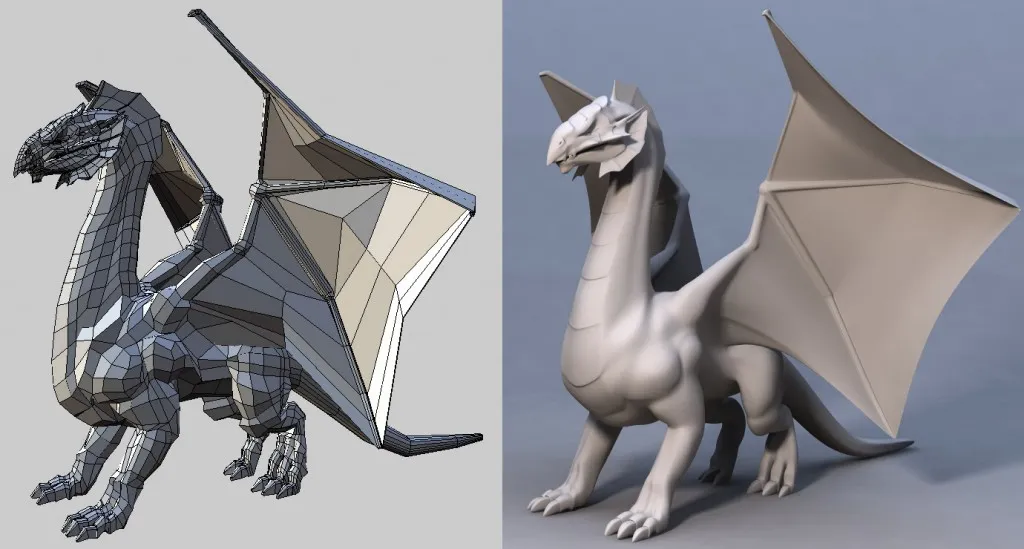
Wings 3D offers a focused environment for polygonal modeling without the distractions of animation or rendering features. It caters to users who prefer modeling static objects, such as props, assets, or figures, for games or 3D printing.
The interface is intuitive and context-sensitive, displaying tools based on the particular selection. One of the best 3d modeling software for beginners and intermediate users with its lightweight nature and dedicated approach to subdivision modeling.
4. SketchUp
SketchUp Scalable 3D Software (Source: Universitas Gunadarma)
For those working in architecture or interior design, SketchUp remains a top pick thanks to its approachable interface and precision tools. It’s especially popular among architects, urban planners, and construction professionals.
The software supports a plugin-rich ecosystem that allows for photorealistic rendering, BIM features, and more. While it’s simple enough for beginners to grasp, SketchUp also scales up well for commercial and professional use with its Pro version.
5. FreeCAD
FreeCAD Software for Architect (Source: VectorSeek)
FreeCAD brings a parametric approach to 3D modeling. This makes it particularly powerful for mechanical engineering, industrial design, and architecture. While its interface may seem technical at first glance, it benefits users with packed features, including constraint-based sketching, assembly modeling, and simulation tools.
Pro 3D Modeling Software Fusion 360 (Source: pinterest)
Fusion 360, now Autodesk Fusion, integrates design, engineering, and manufacturing tools in a cloud-connected workspace. With its parametric modeling capabilities, CAM tools, and generative design options, it’s well-suited for industrial design, mechanical engineering, and CNC workflows.
Fusion also supports collaboration, allowing multiple users to work on projects simultaneously. Professionals and advanced hobbyists working on functional prototypes or production-ready parts will find it especially useful.
7. Cinema 4D
Cinema 4D for Motion Graphic (Source: 1000Logos)
Cinema 4D is widely recognized for its excellence in motion graphics, thanks to its intuitive UI and powerful MoGraph tools. It offers a streamlined learning experience for newcomers, yet provides robust capabilities for professionals in VFX, animation, and broadcast design.
The software’s integration with After Effects and support for real-time rendering make it an appealing choice for digital content creators who value speed and flexibility. It is the industry standard option if you’re working in animated graphics.
8. Blender
Popular 3D modeling Software Blender (Source: Sketchfab)
Blender is a popular 3D modeling software that provides a complete 3D suite, covering modeling, animation, sculpting, rendering, and compositing. Its extensive feature set is rivaled only by commercial software, making it a favorite among indie developers and small studios.
Whether you’re creating assets for games, animating short films, or experimenting with visual effects, Blender offers tools to handle the entire pipeline, backed by a large and active community. With its community support and abundant tutorials, it can serve both hobbyists and professionals.
3ds Max Industry Standard 3D Modeling Software (Source: 1000Logos)
Autodesk’s 3ds Max excels in creating detailed environments and hard-surface models, making it one of the best 3D modeling software programs in architectural visualization and game development. Its robust modifier stack and extensive modeling tools support precise workflows for professionals.
Although limited to Windows, it’s favored for producing complex geometry, visual simulations, and high-end renders, and particularly preferred by studios and advanced users in the design and entertainment sectors.
10. Autodesk Maya
Maya Advanced 3D Modeling Software (Source: 1000Logos)
Autodesk Maya is synonymous with top-tier 3D animation. It is used heavily in film, TV, and game studios worldwide. With advanced rigging, dynamics, and character animation tools, it’s built for experienced users and technical artists.
Maya’s strength lies in its ability to handle complex animation sequences, realistic simulations, and large production pipelines. It’s the preferred platform for animators and VFX specialists working at a professional level.
What to Consider When Choosing the Best 3D Modeling Software
The best 3D modeling tools that should complement your vision by facilitating your day-to-day and industrial or sector needs. Indeed, with practice and the right software, your ideas can truly take shape.No matter which software you land on, reliable assets make a world of difference. Explore how the versatile 3D resources crafted by Tridimensi integrate seamlessly into your workflow, so you can turn ideas into visuals faster, cleaner, and more creatively than ever.